
Claude Code doesn't have its own version control. When it commits, branches, or opens a pull request, it runs the same git and gh commands you would, in your repo, with your credentials. Mostly that's good, since everything it does lands in git log like any other work. It also means the usual git mistakes are still on the table, and its own undo feature adds a couple of new ones.
This guide is the everyday part: commits, branches, pull requests, and reviews, plus the handful of settings that change how Claude handles them. Running Claude inside GitHub Actions is its own topic, covered in the CI guide.
Commits: let it read its own diff
The most common git task in a session is the plain one. Claude makes a change, you look at it, and you ask it to commit. It reads the diff and writes the message from what actually changed, which usually beats a message typed from memory at the end of a long day. It usually follows the style your history already uses, so a repo full of feat: and fix(auth): commits gets more of the same.
Two habits help. Ask for small commits, one per logical change, not one big commit when the session ends. And say what should go in. "Commit the auth fix" is clearer than "commit everything" when the working tree also has a half-finished experiment sitting in it.
By default Claude adds a Co-Authored-By trailer to commits and a line to pull request descriptions. The attribution setting controls both, with separate commit and pr keys. Setting attribution to false hides all of it on Claude Code v2.1.281 or later; on older versions, set commit and pr to empty strings instead. The older includeCoAuthoredBy flag still exists but is deprecated.
{
  "attribution": false
}
There's also includeGitInstructions. Setting it to false removes Claude's built-in commit and PR instructions from its context, which only makes sense if you plan to supply your own. Where settings files live and which one wins is in the settings, hooks, and permissions guide.
/rewind is not git
Claude Code keeps checkpoints. Every prompt you send that starts a turn saves the state of files before Claude edits them, and /rewind (or pressing Esc twice on an empty prompt) opens a menu that restores the code, the conversation, or both to an earlier prompt. For "no, not like that" moments it's often quicker than git.
The blind spots matter more than the feature, though:
- Files changed by shell commands aren't tracked. If Claude runs
rm,mv, orcp, rewind can't bring the file back. - Edits from most subagents aren't restored. That includes a background
/code-review --fix. - Edits you make outside the session, or that another session makes, usually aren't captured.
- Snapshots expire. By default a session's are deleted about 30 days after it last saved one, and the
cleanupPeriodDayssetting changes that.
Anthropic's docs describe checkpoints as "designed for quick, session-level recovery." For anything you'd hate to lose, a commit is the real undo. A rhythm that works: commit whenever something works, then let Claude try the risky part. git diff and git restore cover the cases rewind doesn't.
Branches and worktrees
Claude creates and switches branches like any other command, and it's worth asking for one before a change that touches more than a file or two. A branch per task keeps the main line clean and makes the pull request later obvious.
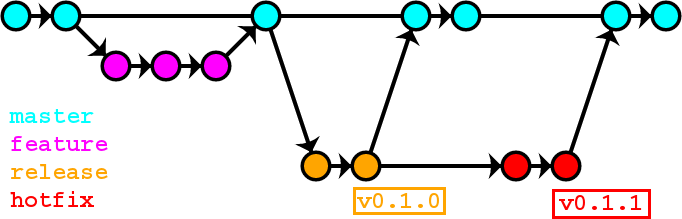
Two sessions working at once is a different problem. One checkout isn't enough, since both would edit the same files. Git worktrees fix that: each one is a separate checkout on its own branch, and Claude Code will make one for you.
claude --worktree feature-authRun it again with another name in a second terminal and you have two isolated sessions. The repo needs at least one commit first. In an empty repository the command fails with Failed to resolve base branch "HEAD", which throws people the first time they see it.
Pull requests
"Create a PR" is a complete instruction. Claude reads the commits on your branch, writes a title and description, and opens the pull request with GitHub's gh CLI (glab on GitLab), so that tool needs to be installed and logged in. The branch has to be pushed first. Say "push and open a PR" and it does both.
Read the description before you merge. It's usually accurate about what changed and thinner on why, and a sentence of context from you helps whoever reviews it. Asking Claude to list the risks in the change is a decent way to find the part you forgot to test.
When Claude opens the PR, Claude Code links the session to it, so getting back later is one command:
claude --from-pr 1234That opens the session picker filtered to sessions tied to PR 1234. Pasting the PR URL into the /resume search works too.
Reviews: /code-review and the paid GitHub version
Two tools share nearly the same name. The /code-review command runs in your terminal on any plan. With no target it reviews your branch's commits ahead of its upstream, plus anything uncommitted; you can also hand it a file, a PR number, a branch, or a range like main...my-feature. It runs as a background subagent, so it doesn't eat your conversation, and it reports bugs along with reuse and simplification cleanups.
A few flags are worth knowing. --fix applies the findings, --comment posts them to the pull request as inline comments, and an effort level trades coverage for confidence: low and medium give fewer, surer findings, while high through max cast a wider net and let in some guesses. The rewind caveat applies here. A background --fix edits outside your checkpoints, so undo it with git.
Code Review, the managed version, is a GitHub App that reviews pull requests on Anthropic's infrastructure and posts inline comments tagged by severity. It's a research preview for Team and Enterprise plans, and it isn't cheap. The docs put the average at $15 to $25 a review, billed as usage credits outside your plan. It never blocks a merge by itself, and a REVIEW.md at the repo root tells it what to flag.
Guardrails: what Claude can run without asking
Most people end up letting routine git commands through and keeping pushes behind a prompt, or blocking them outright. Permission rules handle it. Anthropic's own example allows commits and refuses pushes:
{
  "permissions": {
    "allow": ["Bash(npm run *)", "Bash(git commit *)"],
    "deny": ["Bash(git push *)"]
  }
}
Rules are checked in a fixed order, deny, then ask, then allow, so a narrow allow rule can't poke a hole in a broad deny. The pattern matches the command as written, though. The docs point out that git -C . push origin main doesn't match Bash(git push *). These rules catch honest mistakes. Branch protection on GitHub stops a force-push to main no matter who types it.
When the server and GitHub disagree
This one comes up for anyone running Claude Code both on a server and on their own machine, and it happened on this site in September. For about a month, work was committed and pushed from a laptop clone, while the production server ran from its own checkout. The server's files were current, since they'd been deployed. Its git history wasn't. It reported 23 commits behind GitHub and a long list of "modified" files that were mostly the same changes.
The obvious move is git reset --hard origin/main, and it's the wrong one on a live box. In git's own words, --hard will "Overwrite all files and directories with the version from <commit>", uncommitted work included. The fix was the default mode, --mixed, which moves the branch pointer and leaves the working files alone. After that, git status showed only the real differences.
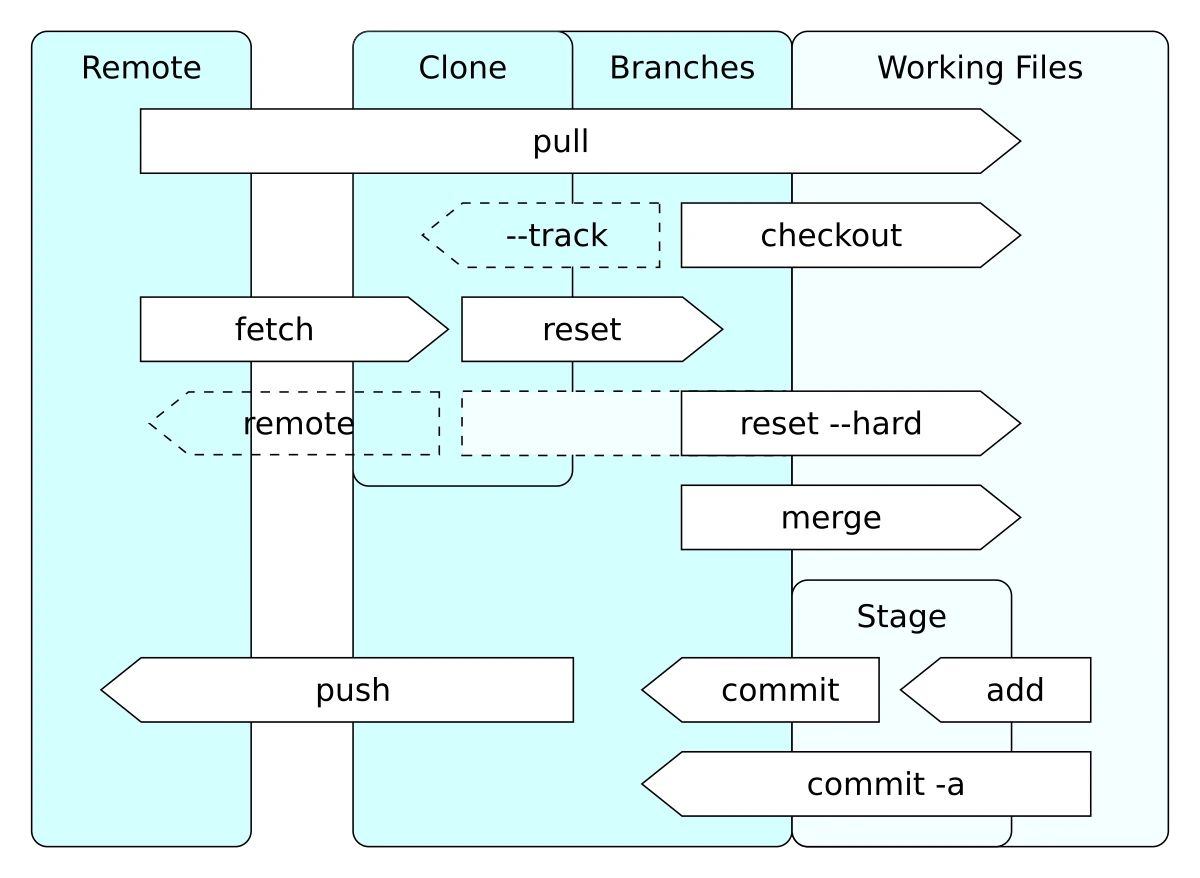
One file in that short list was an older copy than GitHub's, missing a check added later. A hard reset would have quietly replaced it without anyone knowing it had been wrong; the mixed reset put it on screen. The same pass found two weeks of work that had never been committed at all, which went up as five commits.
What came out of it: say in CLAUDE.md which copy is the source of truth, have Claude run git fetch and git status before any reset or pull, and ask to see the diff before anything gets discarded. The CLAUDE.md guide covers where standing instructions like that belong.
Sources
- Claude Code docs: Checkpointing, Common workflows, Code Review, Configure permissions, and Settings reference
- Git documentation: git-reset
- Cover photo: "CSS code on a screen" by Sai Kiran Anagani, via Unsplash and Wikimedia Commons, CC0 1.0 (public domain dedication), cropped
- "Git operations" diagram by Daniel Kinzler, via Wikimedia Commons, licensed CC BY 3.0, converted from SVG
- "OneFlow Example" by Qeef, via Wikimedia Commons, licensed CC BY-SA 4.0