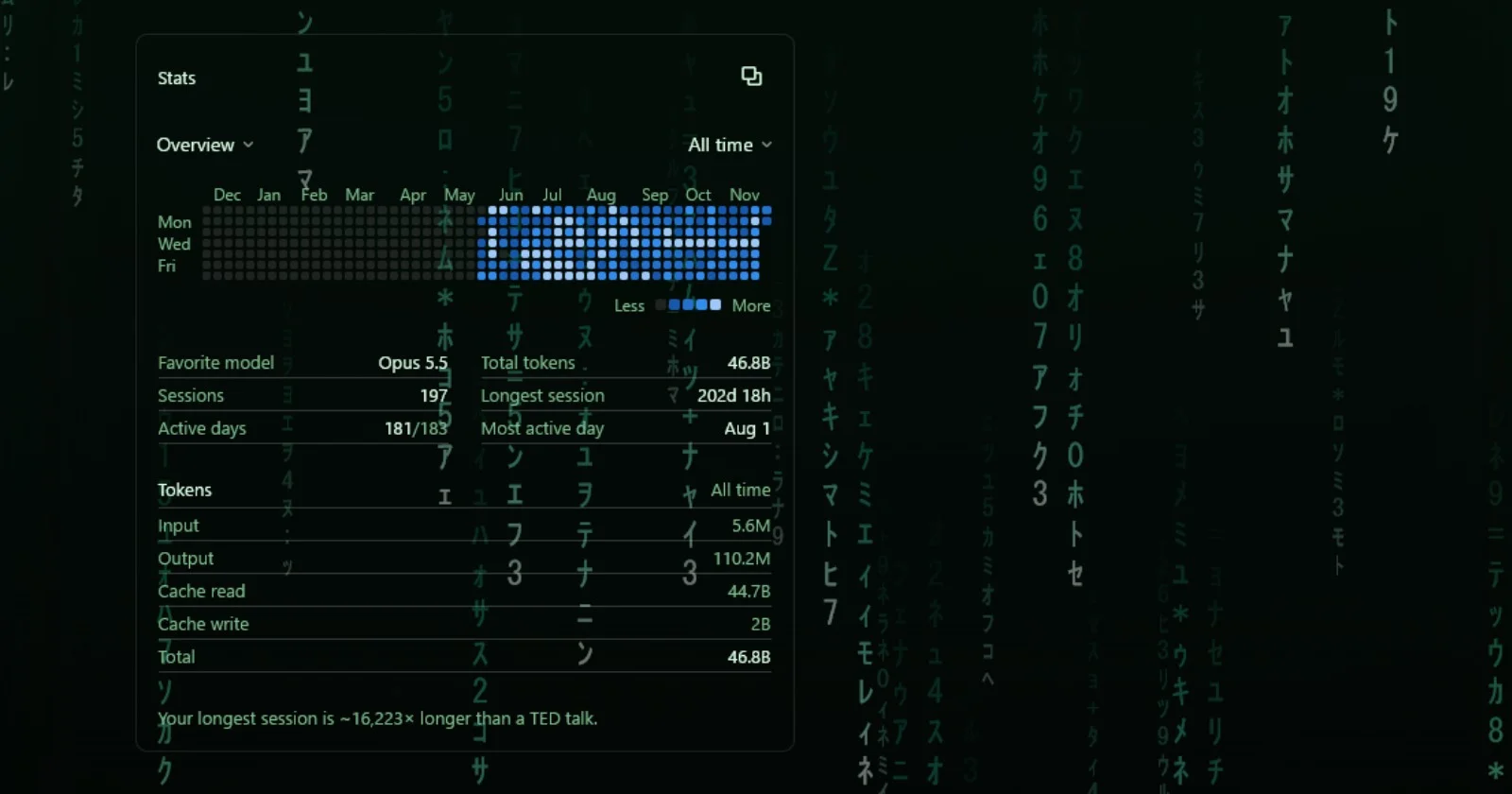
The Claude Code card with your total token usage is gone on Claude Code desktop when you open the app or start a new chat, but it's still there if you're trying to find it. Typing /stats brings it back.
The card opens on an overview with a heatmap of the days you've used Claude Code, shaded by how busy each day was, and a menu for the time range that includes all time. Under the heatmap are your favorite model, total tokens, number of sessions, longest session, active days, and most active day. A second section splits the token total into input, output, cache read, and cache write, and the card ends with a line comparing your input and output to the length of Harry Potter and the Philosopher's Stone.
The command works in the terminal too: in version 2.1.118, Anthropic merged /stats and /cost into one command, /usage, and the changelog says both old names "remain as typing shortcuts that open the relevant tab." Anthropic's command reference lists /stats as an alias for /usage that opens on the Stats tab. The stats screen first showed up in version 2.0.64 with a favorite model, a usage graph, and a usage streak, and version 2.1.6 added a date filter: press r to cycle through the last 7 days, the last 30 days, and all time.
The total tends to look huge, and on one account we checked, with 181 active days, the card showed 46.3 billion tokens, and 44.2 billion of them were cache reads, about 95%. Output came to 109.1 million tokens and input to just 5.6 million. Anthropic's prompt caching docs explain how that happens: each time you send a message, Claude Code sends the full context again, including the system prompt, your project context, and all the earlier messages and tool results, and the part the API already has stored gets counted as a cache read. A long session counts the same conversation over and over, and the cache reads pile up fast.
In the terminal, the Session block of /usage has the per-session numbers: the current session's cost and token counts by model. Since version 2.1.211, those totals reset when /clear starts a new session, and before that they kept adding up for as long as Claude Code stayed open. The docs say that cost figure is meant for API users, since Pro, Max, and Ultra subscriptions already include their usage.
Your plan limits show up in yet another place. In the desktop app, clicking the usage ring in the row under the prompt box shows your plan usage, and Anthropic says it's shared across all your Claude Code surfaces. Our post on whether Claude Code usage is separate from Claude chat covers how those limits work.
Sources
Claude Code docs: Commands - /stats and /cost as aliases for /usage, and /stats opening on the Stats tab.
Claude Code changelog - The /stats launch in 2.0.64, the date filter in 2.1.6, and the merge into /usage in 2.1.118.
Claude Code docs: Manage costs - The /usage Session block, who its cost figure is for, and the totals resetting on /clear since 2.1.211.
Claude Code docs: Prompt caching - Why Claude Code sends the full context again with each message.
Claude Code docs: Desktop - The usage ring under the prompt box and plan usage shared across Claude Code surfaces.