
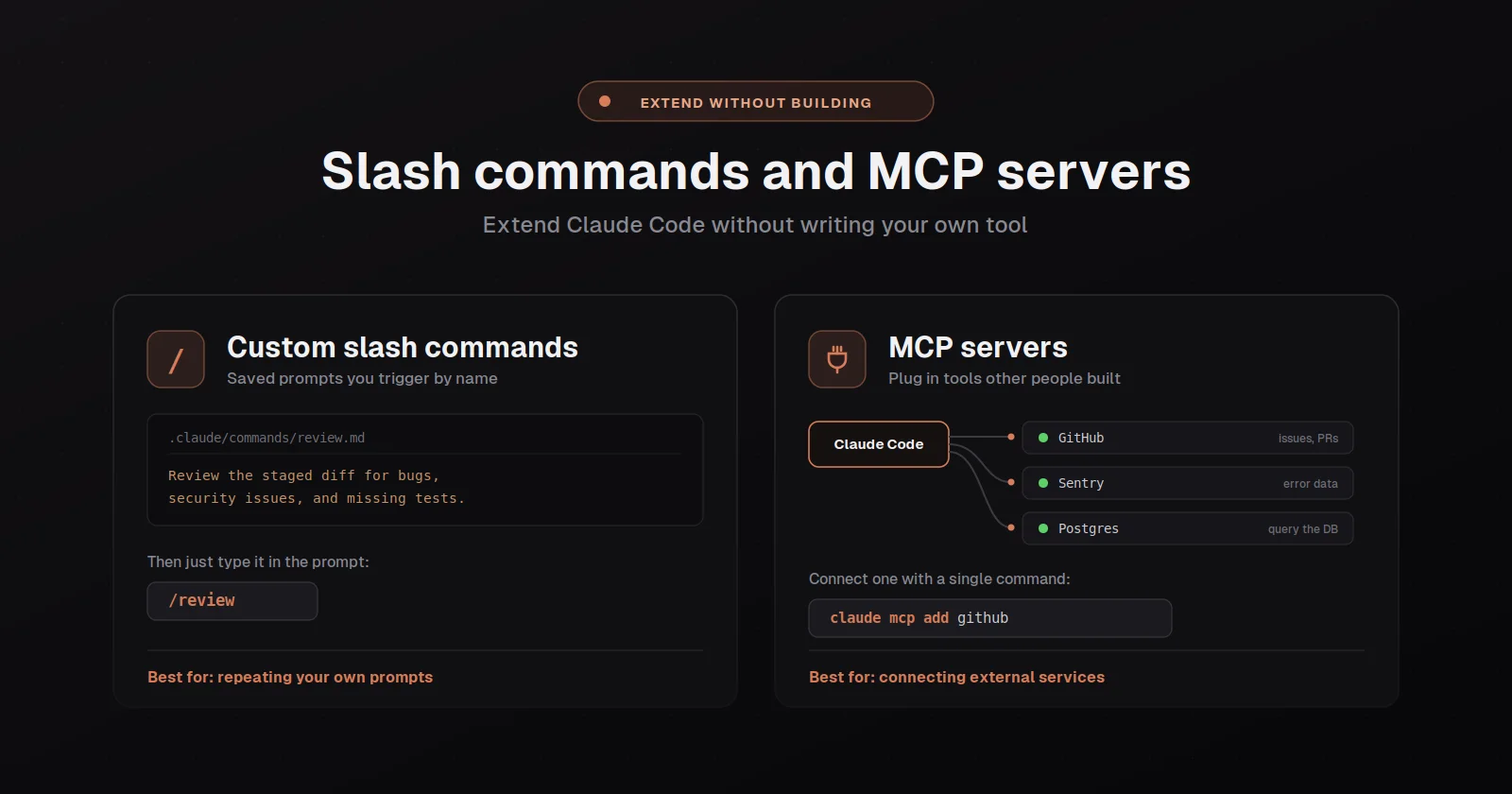
The two big extension surfaces in Claude Code are skills, which are markdown files in your repo that become custom slash commands the tool can run, and MCP servers, which are external services that connect to the tool over a standard protocol and expose new tools the model can call. They sit at different layers and solve different problems, where skills are for codifying your own workflows in language the model reads as instructions, and MCP servers are for giving the model access to external systems like GitHub, Sentry, Postgres, or your own internal services. Both are genuinely underused, where most users discover them weeks or months in after wishing they had them on day one.
The thing worth understanding up front is that the choice between skills, MCP servers, hooks, subagents, and plugins isn't a hierarchy where one is better than the others, it's a question of what shape of extension you actually need. Anthropic's own features overview walks through this decision and the short version is: use a skill when you keep pasting the same instructions or running the same multi-step procedure; use an MCP server when the model needs access to a system it can't reach with the built-in tools; use a hook when something must happen reliably at a lifecycle event; use a subagent when a side task would clutter your main context. The right move on day one is usually to start with skills (lowest friction, biggest immediate payoff), add MCP servers when you hit a specific external system you want the model to use, and only reach for hooks and subagents once those don't fit.
Skills: custom slash commands as markdown files
A skill is a directory under .claude/skills/ (or ~/.claude/skills/ for personal skills, or inside a plugin for shared ones) with a SKILL.md at its root, where the directory name becomes the slash command and the file content is the instructions the model follows when the skill runs. The minimum viable skill is a directory and a one-file SKILL.md, and the shape is:
---
description: Summarizes uncommitted changes and flags anything risky. Use when the user asks what changed or asks for a commit message.
---
## Current changes
!`git diff HEAD`
## Instructions
Summarize the changes above in two or three bullet points, then list any risks you notice such as missing error handling, hardcoded values, or tests that need updating.
That skill becomes /summarize-changes if you put it at ~/.claude/skills/summarize-changes/SKILL.md. The !`git diff HEAD` line is dynamic context injection: the tool runs the shell command before the model sees the skill content and substitutes the output in place, so the model gets the actual diff inlined into its prompt rather than having to fetch it separately. This is the killer feature of skills and the thing most people miss when first reading the docs: skills can pull live data into the model's context at the moment of invocation.
The frontmatter has more knobs worth knowing about. disable-model-invocation: true makes the skill manual-only, where the model won't load it automatically but you can still invoke it with /skill-name. This is the right setting for workflows with side effects like /deploy, /commit, or /send-message, where you don't want the model deciding the moment is right. allowed-tools lists tools the model can use without permission prompts while the skill is active (allowed-tools: Bash(git add *) Bash(git commit *) on a commit skill), which is how you make a skill ergonomic without loosening your global permission policy. context: fork runs the skill in a subagent context with isolated context window, which is useful for research-shaped skills that read many files. paths: with a glob list scopes when the skill is loaded into context automatically, so a frontend skill only loads when working with frontend files.
Where you put the skill determines who sees it: ~/.claude/skills/ is personal and works in every project; .claude/skills/ in a repo is shared with whoever clones the repo; a skill inside a plugin is distributed via the plugin marketplace and works wherever the plugin is installed. The tool watches these directories and reloads live when a file changes, so you can iterate on a skill in your editor and the new version is active on the next invocation without restarting.
Skills also support arguments via $ARGUMENTS (the full string), $ARGUMENTS[0] or $0 (specific positional), and named arguments declared in frontmatter. A /fix-issue skill might be:
---
description: Fix a GitHub issue
disable-model-invocation: true
---
Fix GitHub issue $ARGUMENTS:
1. Use gh issue view to get the issue details
2. Implement the fix
3. Run tests and verify
4. Open a PR
Running /fix-issue 1234 substitutes 1234 for $ARGUMENTS and the model executes the steps against that issue number. This is the bones of how to turn a recurring task into a one-line command.
The skill content lifecycle, and why concise skills work better
The thing worth knowing about skills that doesn't show up in introductions is that once a skill is invoked, its content enters the conversation as a single message and stays there for the rest of the session, where the model doesn't re-read the skill file on later turns and every line in the skill is a recurring token cost. This means the same advice that applies to CLAUDE.md applies to skill content: keep it concise, focus on what the model needs to do, and move long reference material into supporting files that get loaded only when actually needed.
The directory structure that scales for non-trivial skills is to keep SKILL.md short (under 500 lines per the docs) and reference supporting files from it: my-skill/ contains SKILL.md plus a reference.md and examples.md and maybe a scripts/helper.py. The main file is concise and tells the model when to load the supporting files; the supporting files only enter the context when the model actually opens them.
The bundled skills the tool ships are good examples of this pattern, where /code-review, /debug, /loop, /run, and /verify are all skills internally rather than hardcoded commands, and reading their content (which you can do with /skill-name --view-style approaches or just by finding them in the tool's bundle) is one of the better ways to learn what an effective skill looks like. The /run-skill-generator bundled skill is especially worth knowing about: it walks you through getting your app running from a clean environment, captures what worked (install commands, env vars, launch script), and commits the recipe as a per-project skill at .claude/skills/run-<name>/, which then powers /run and /verify for that project.
MCP servers: how to give the model access to external systems
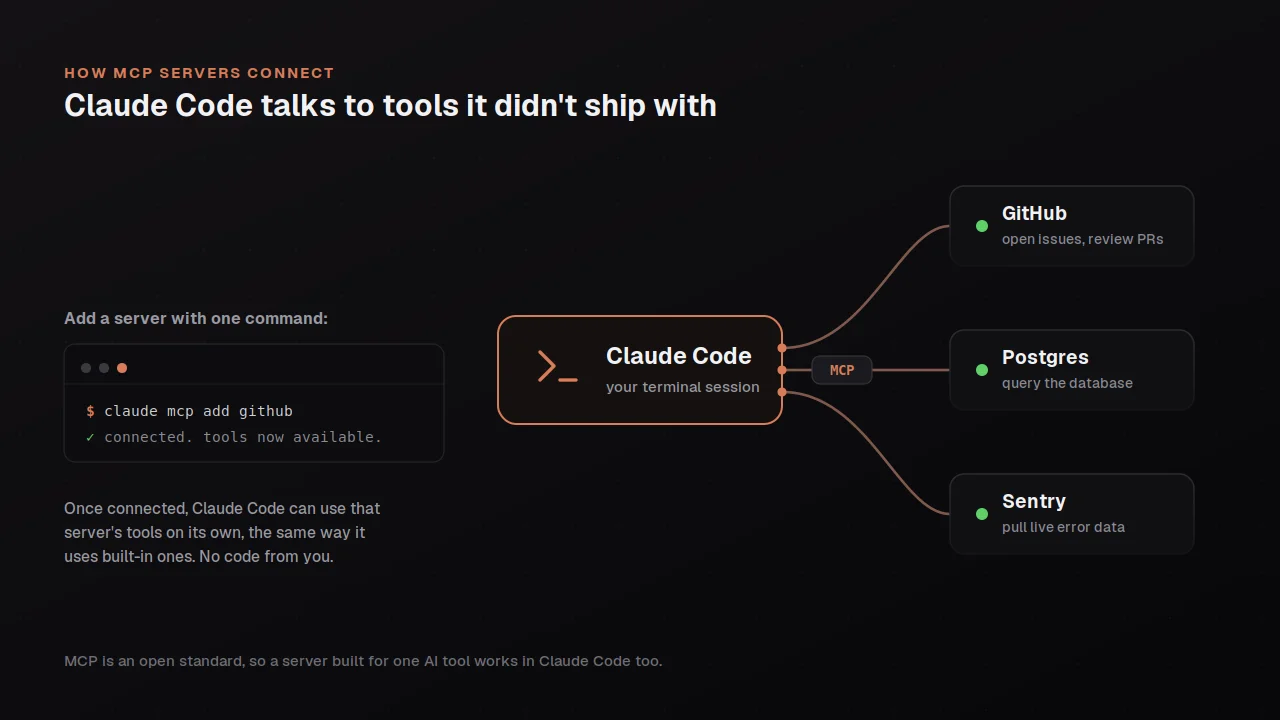
The Model Context Protocol is an open standard for connecting AI tools to external data sources, and Claude Code supports it as a first-class extension point. The full reference is at code.claude.com/docs/en/mcp and the practical version is that MCP servers expose new tools to the model (read tickets from Jira, query rows from your Postgres, search Sentry errors, post to Slack), and you connect to them with claude mcp add from the command line.
The three connection types are HTTP (for hosted servers exposed over a URL), SSE (server-sent events, similar to HTTP), and stdio (for local servers you run as a subprocess). The shapes are:
claude mcp add --transport http sentry https://mcp.sentry.dev/mcp
claude mcp add --transport http github https://api.githubcopilot.com/mcp/ --header "Authorization: Bearer YOUR_GITHUB_PAT"
claude mcp add --transport stdio db -- npx -y @bytebase/dbhub --dsn "postgresql://readonly:[email protected]:5432/analytics"
Once connected, the server's tools show up to the model with names like mcp__sentry__list_issues or mcp__github__create_pull_request, and the model can call them the same way it calls built-in tools. You can list connected servers with claude mcp list, inspect one with claude mcp get <name>, and remove with claude mcp remove <name>. The /mcp command in a session shows the live status of all connected servers and lets you do OAuth-based auth flows for servers that need it.
MCP server configurations live in three scopes: local at ~/.claude.json (private to you), project at .mcp.json (shared via version control with whoever clones the repo), and user at ~/.claude.json. The project-scoped .mcp.json is where you put servers the whole team should connect to (your shared database, your internal APIs), and the local config is where you put personal credentials and individual server preferences.
The popular MCP servers worth knowing about as starting points are GitHub (PR management, issue triage, code review), Sentry (error monitoring), Postgres (database queries via @bytebase/dbhub or similar), Notion (docs, tickets), Slack (channels, messages), and Figma (designs). For internal systems where no public MCP server exists, you can write your own using the MCP SDK in TypeScript or Python; the tool calls it the same way it calls public servers, and you get the same model-orchestration story for whatever proprietary systems matter to your work.
Permission rules for MCP tools work the same way as for built-in tools: mcp__github matches any tool from the GitHub server, mcp__github__* is the wildcard equivalent, and mcp__github__create_pull_request matches the specific tool. You can pre-approve, gate, or block specific MCP tools through your permissions.allow, permissions.ask, and permissions.deny lists, which is how you'd let the model use the GitHub server for reads but require a prompt before writes.
The choice between skills, MCP, hooks, subagents, and plugins
The five extension mechanisms in Claude Code overlap in places and the question of which to reach for is worth thinking through deliberately. The mental model that's helped me most is to map each mechanism to the problem it actually solves:
A skill solves the problem of "I keep pasting the same instructions" or "I want a one-line command for this multi-step task." The unit of skill content is instructions for the model written in markdown. Skills are the right choice when the work is something the model can do with its existing tools and you mainly want to package the instructions.
An MCP server solves the problem of "the model needs access to a system it can't reach with built-in tools." The unit of MCP content is new tools the model can call. MCP is the right choice when the gap is access to external data or systems rather than instructions about what to do.
A hook solves the problem of "this must happen reliably at a lifecycle event regardless of what the model decides." The unit of hook content is a shell command (or HTTP call, MCP tool call, prompt, or subagent invocation) that runs deterministically. Hooks are the right choice when you need enforcement rather than encouragement.
A subagent solves the problem of "this side task would clutter my main context." The unit of subagent content is a specialized assistant with its own system prompt, tool restrictions, and context window. Subagents are the right choice when the work would otherwise force the main session to read many files or run many side commands.
A plugin solves the problem of "I want to bundle and distribute several of the above as a single installable unit." Plugins package skills, hooks, subagents, MCP servers, and themes together so the whole bundle installs and updates as one. Plugins are the right choice when you have a coherent set of extensions you want to share, either across your own projects or with the broader community via the plugin marketplace (accessible from /plugin inside the tool).
The most common mistake is reaching for the heaviest mechanism when a lighter one would do, where someone writes a custom MCP server for what could have been a one-page skill, or writes an elaborate hook for what should have been a line in CLAUDE.md. The discipline is to start with the lightest mechanism that solves your actual problem and only escalate when you need more, where CLAUDE.md is the lightest, then skills, then MCP and subagents, then hooks, then plugins.
The bigger picture
The reason the extension surface is worth investing in once you've used the tool enough to have opinions is that it's how you turn Claude Code from a generic assistant into a tool genuinely shaped to the work you specifically do. The built-in defaults are good and you can get a lot done without ever writing a skill or connecting an MCP server, but the difference between a generic setup and one that's been tuned to your actual workflow is large in a way that doesn't show up in any single moment but accumulates across every session. A few well-written skills for your recurring tasks, two or three MCP servers connecting the tool to the systems you work in daily, and a handful of permission rules that pre-approve the commands you actually use add up to a meaningfully different experience.
The other piece of the bigger picture is that the right time to start writing skills is later than most introductions suggest, where the temptation on day one is to set up an elaborate configuration before you've used the tool enough to know what's actually worth packaging. The honest sequence is to use the tool with defaults for a week or two, notice the things you keep doing manually that could be commands, notice the systems you keep wishing the model could access, and only then build out the extensions that match what your actual usage looks like. The extensions you write after a real week of usage are the ones that actually compound, where the extensions you write on day one based on what seems like it should be useful tend to be wrong about what you actually need.