 Paul
Paul
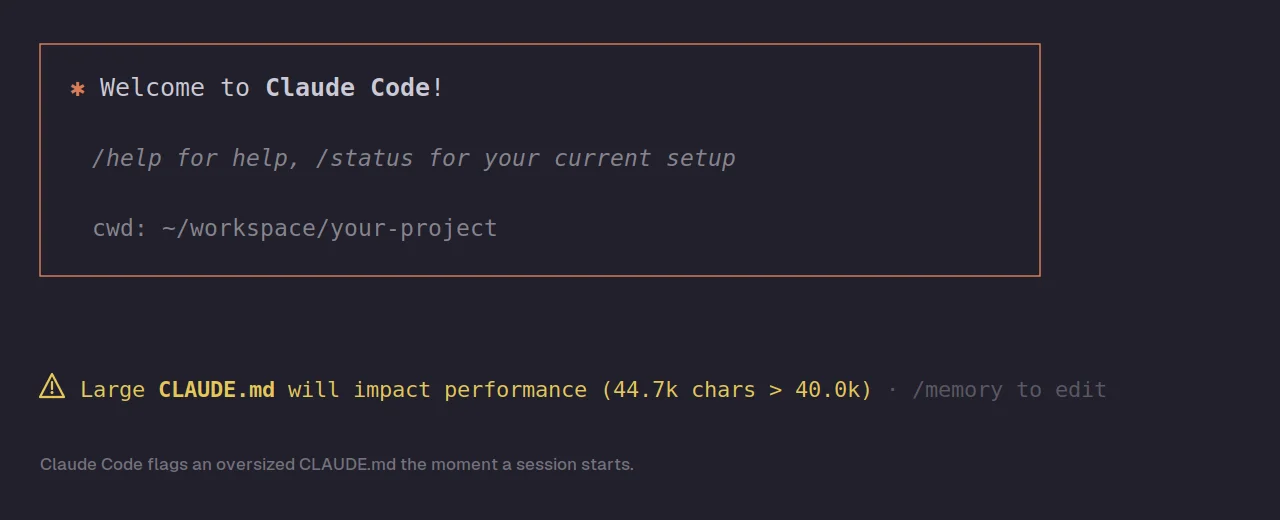
If you've used Claude Code on a project for more than a few weeks, there's a good chance you've eventually opened a session and seen a warning that looks something like this: a yellow alert telling you that your CLAUDE.md will impact performance because it has crossed forty thousand characters, with a note pointing you to the /memory command to edit it. The first time you see it, the natural reaction is mild alarm followed by uncertainty about what you're actually supposed to do, because the warning tells you there's a problem but doesn't really explain how to fix it properly. This post is about what that warning actually means and what the right response to it is.
The short version is that the warning is worth taking seriously but it is not an emergency, and the fix is straightforward once you understand why the file size matters. The longer version involves understanding how CLAUDE.md actually works, which is worth knowing because the most common fixes people reach for don't actually solve the underlying problem the way they think they do.
Why the warning happens
The warning exists because of how CLAUDE.md is used. Your CLAUDE.md file is loaded into the context window at the start of every single session, where it sits alongside your actual conversation and consumes tokens the entire time you're working. It's essentially a prompt that gets prepended to everything you do, and that's by design, because the whole point of the file is to give Claude persistent knowledge about your project that carries across sessions without you having to re-explain it every time.
The tradeoff is that everything you put in CLAUDE.md has a cost, where a larger file means more of your context window is consumed before you've even started working, and that has two consequences worth understanding. The first is the obvious one, which is that a large CLAUDE.md leaves less room for the actual work, the code Claude reads, the conversation you have, and the files you reference during the session. The second consequence is less obvious but more important, which is that a bloated instruction file actually reduces how reliably Claude follows your instructions at all.
That second point is the one most people miss. The intuition that a longer CLAUDE.md means Claude knows more about your project and therefore behaves better is backwards past a certain point. Research into how language models handle instructions suggests that when an instruction file gets too large and includes too much non-essential content, the model tends to dismiss instructions wholesale rather than selectively filtering out the irrelevant parts. In other words, a forty thousand character CLAUDE.md doesn't make Claude follow forty thousand characters worth of instructions, it makes Claude follow your instructions less reliably than a tight, focused file would. The warning isn't just about token cost, it's about adherence.
The mistake of just ignoring it
The most common response to the warning, and you'll see this in the discussions about it online, is to notice that nothing seems obviously broken and conclude that the warning can be safely ignored. The platform still works, Claude still responds, the session still runs, so people shrug and move on. This is understandable but it's the wrong call, because the cost of a bloated CLAUDE.md is mostly invisible in the moment.
You don't see the instructions Claude quietly stopped following. You don't see the context window space that would have let Claude hold more of your codebase in mind at once. You don't see the tokens being spent on the same oversized file at the start of every session, which adds up over weeks of use. The warning is Claude Code telling you about a real cost, and the fact that the cost is hard to perceive directly is exactly why it's worth addressing rather than dismissing. This is part of a broader pattern with AI coding tools where the costs of using them carelessly tend to be invisible right up until the moment they aren't, which I've written about more fully in why Claude Code is going to fail you eventually and you need to be ready.
There's also a known quirk worth mentioning, which is that the character count in the warning can sometimes be inflated, because Claude Code may be counting multiple CLAUDE.md files together. If you have a global CLAUDE.md in your home directory and a project-specific one, the warning might report a combined number that's larger than either file actually is. That doesn't mean you should ignore the warning, but it does mean that when you go to investigate, you should check all the CLAUDE.md files that apply to your project rather than assuming the whole problem is in one file.
What actually fixes it
The real fix is to get your CLAUDE.md back to a focused, essential core, and the target worth aiming for is meaningfully smaller than the forty thousand character warning threshold. The official guidance suggests keeping each CLAUDE.md file under two hundred lines, and plenty of experienced users keep theirs much shorter than that. The goal is not to squeeze under the warning by a few characters, it's to get the file back to containing only what genuinely needs to load every single session.
The way to do that is to go through your CLAUDE.md and sort everything in it into two piles. The first pile is the content that applies to essentially every session regardless of what you're working on, things like your tech stack, your project's overall structure, your core coding conventions, and the handful of rules that matter no matter what part of the codebase you're touching. That pile stays in CLAUDE.md. The second pile is everything that only matters in specific situations, like detailed guidance about one particular subsystem, long explanations of edge cases, verbose API documentation, or instructions that only apply when you're working in one corner of the project. That pile needs to come out.
A useful mental model for the sort is the distinction between nouns and verbs, where CLAUDE.md should hold the nouns, meaning what things are and where they live, your project overview and architecture and standards, while the detailed how-to-do-specific-things content belongs elsewhere. If a piece of content in your CLAUDE.md is teaching Claude how to perform a specific task rather than telling it what your project fundamentally is, that's a strong signal it doesn't belong in the always-loaded file.
The other big source of bloat worth cutting is content that doesn't need to be there at all. A surprising amount of what ends up in a large CLAUDE.md is Claude being told about things it already knows, like how a standard linter works or what a common framework does, and that content is pure waste because it consumes context without adding anything. Static content that goes stale is another problem, like a hand-maintained file tree that stops being accurate the moment you add a directory. Cut the redundant content, cut the stale content, and a lot of files get back under the threshold from that alone.
The thing most people get wrong about the fix
Here's the part where a lot of advice about this warning is subtly wrong, and it's worth getting right. The most common suggested fix is to take the detailed content out of CLAUDE.md and move it into separate files, then reference those files from CLAUDE.md using the @path import syntax. That sounds like it solves the problem, and it does help with one thing, but it doesn't do what most people think.
The important detail is that files imported into CLAUDE.md with the @import syntax are still loaded into the context window at launch, the same as the content of CLAUDE.md itself. The official documentation is explicit about this, where imported files are expanded and loaded into context alongside the file that references them. So if you take twenty thousand characters of detailed content out of your CLAUDE.md and move it into a separate file that you then @import, you've organized your content more neatly but you haven't actually reduced what gets loaded every session. The context cost is the same, you've just spread it across more files.
Imports are genuinely useful for organization and for keeping your main file readable, so this isn't a reason to avoid them. But if your actual goal is to reduce the context cost and clear the performance warning, moving content into @imported files won't get you there, because the imported content still loads. You have to actually remove the content from the always-loaded path, not just relocate it.
The mechanism that does reduce context cost is path-scoped rules, where instead of putting content in CLAUDE.md or in an @imported file, you put it in a rule that only loads when Claude is actually working with matching files. Detailed guidance about your authentication system, for example, can live in a rule scoped to your auth directory, so it loads into context when Claude touches that part of the codebase and stays out of context the rest of the time. This is the actual progressive disclosure mechanism, where the detailed content exists and is available but only enters the context window when it's relevant, which is what you want. The everyday essentials live in a lean CLAUDE.md, and the situational depth lives in path-scoped rules that load on demand.
A practical approach
If you're staring at the warning right now, here's a sequence that works. Start by running the /memory command to open your CLAUDE.md, and read through the whole thing with fresh eyes, because files that grew gradually over weeks tend to accumulate content nobody would add deliberately if they were starting from scratch. Identify the genuinely universal content, the stack and structure and core conventions, and recognize that as the keeper pile.
Then for everything else, decide where it should go. Content that's redundant or stale just gets deleted outright. Content that's detailed guidance for a specific part of the codebase should become a path-scoped rule that loads only when Claude works in that area. Content that's reference material you occasionally need can live in a regular documentation file that Claude reads when a task calls for it, rather than something loaded every session. The result should be a CLAUDE.md that's a lean core of universally-applicable instructions, with the depth pushed out to places that load on demand.
One genuinely useful habit worth adopting, since it both prevents future bloat and improves Claude's behavior, is to be deliberate about what you add to CLAUDE.md going forward. A lot of CLAUDE.md bloat comes from a specific pattern, where Claude makes a mistake, you tell it to add a rule to CLAUDE.md so it doesn't repeat the mistake, and over months of doing that the file fills up with dozens of narrow corrections. That instinct to capture corrections is good, but the corrections that are narrow and situational should go into path-scoped rules rather than the main file, so the main file stays focused on what's universal. Treat CLAUDE.md as a living document that needs occasional pruning, not just occasional additions, and apply the same kind of upfront discipline you'd apply to deciding which platforms are worth building in the first place, where being deliberate at the start saves you from a much harder cleanup later.
The warning, in the end, is a useful nudge rather than a problem. It's Claude Code telling you that your instruction file has grown past the point where it's helping, and the work of trimming it back is genuinely worth doing, because a lean focused CLAUDE.md doesn't just clear the warning, it makes Claude follow your instructions more reliably and leaves more room in the context window for the actual work. A few minutes of pruning buys you a meaningfully better working relationship with the tool. And if you've shipped something interesting with that better working relationship, you can add it to the ClaudeFolio directory alongside the rest of the projects built with Claude Code, or just browse what other builders have shipped for ideas on what's possible.